
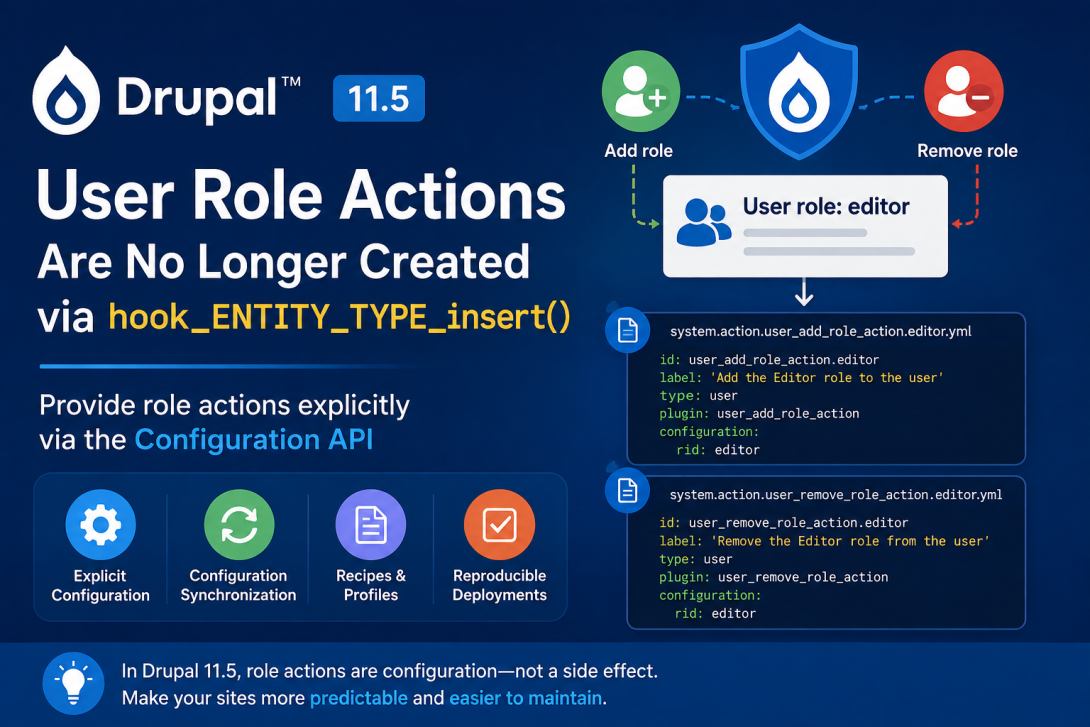
Drupal 11.5 introduces an important change for module developers and maintainers of installation profiles, recipes, and distributions: system actions for adding and removing roles are no longer automatically created through hook_user_role_insert().
The affected actions are:
system.action.user_add_role_action.<role_id>
system.action.user_remove_role_action.<role_id>
Instead of being generated as part of the role entity insertion process, these actions can now be provided through Drupal's Configuration API.
This makes the configuration of role-related actions explicit and predictable, particularly for configuration synchronization, recipes, and installation profiles.
What Changed in Drupal 11.5?
Before Drupal 11.5, the creation of a user role could trigger hook_user_role_insert() and result in the corresponding system actions being created automatically.
The actions include:
user_add_role_action
user_remove_role_action
For a role with the ID editor, this could result in:
system.action.user_add_role_action.editor
system.action.user_remove_role_action.editor
Starting with Drupal 11.5, this automatic creation no longer happens as part of the role entity insert process.
Instead, the actions should be treated as configuration.
Why Is This Changing?
The old approach tied the existence of configuration-like actions to an entity lifecycle hook.
That created an implicit relationship:
Create role
    ↓
hook_user_role_insert()
    ↓
Create system actions
Drupal 11.5 moves toward a more explicit configuration-driven model:
Role configuration
        +
Action configuration
        ↓
Configuration API
This is especially useful for projects that need reproducible configuration across environments.
For example:
Development
     ↓
Configuration export
     ↓
Git repository
     ↓
Production
The role and its associated actions can now be represented explicitly in configuration.
The Actions Affected
The change concerns two system actions.
Add a role
system.action.user_add_role_action.<role_id>
Remove a role
system.action.user_remove_role_action.<role_id>
For example, if the role machine name is:
editor
the corresponding configuration IDs are:
system.action.user_add_role_action.editor
system.action.user_remove_role_action.editor
The <role_id> is the machine name of the role.
What Happens When a Role Is Created Through the UI?
There is an important exception.
When an administrator creates a role through the Drupal administration UI, the user_add_role and user_remove_role system actions are still created automatically.
So this change primarily affects developers and automated configuration workflows.
Conceptually:
                    Create role
                         │
             ┌───────────┴───────────┐
             │                       │
       Admin UI                  Programmatic
             │                       │
             ▼                       ▼
      Actions created        No automatic actions
This distinction is important when testing a module.
Before Drupal 11.5
Historically, the role insertion process could result in system actions being created automatically.
For example, code creating a role:
use Drupal\user\Entity\Role;

$role = Role::create([
  'id' => 'editor',
  'label' => 'Editor',
]);

$role->save();
could previously lead to role-related actions being created as a side effect.
Developers should no longer depend on this behavior.
Drupal 11.5: Treat Actions as Configuration
If your project requires these actions, include them explicitly as configuration.
For example, an exported configuration set might contain:
config/
├── system.action.user_add_role_action.editor.yml
└── system.action.user_remove_role_action.editor.yml
A simplified add-role action configuration can look like:
id: user_add_role_action.editor
label: 'Add the Editor role to the user'
type: user
plugin: user_add_role_action
configuration:
  rid: editor
And the corresponding remove-role action:
id: user_remove_role_action.editor
label: 'Remove the Editor role from the user'
type: user
plugin: user_remove_role_action
configuration:
  rid: editor
The exact exported configuration should be generated by Drupal and committed to your project's configuration repository rather than manually constructing production configuration whenever possible.
Why Configuration Synchronization Matters
This change is particularly relevant to Drupal projects using configuration management.
Imagine a project that defines an editor role.
Previously, developers could create the role and expect the related actions to appear as a side effect.
With Drupal 11.5, the configuration should explicitly contain everything the application requires:
Role
 └── editor

Actions
 ├── user_add_role_action.editor
 └── user_remove_role_action.editor
This makes the configuration state reproducible.
A deployment can then use the normal configuration synchronization workflow:
drush config:export
followed by:
drush config:import
The important principle is that required actions should be part of the project's configuration, rather than relying on a role creation side effect.
Recipes and Installation Profiles
The change is particularly important for Drupal recipes and installation profiles.
Suppose a recipe creates an editor role and expects another component to use an action that adds this role to users.
The recipe should explicitly provide the required action configuration.
Conceptually:
Recipe
│
├── Editor role
│
├── Add Editor role action
│
└── Remove Editor role action
This is preferable to relying on an entity insert hook to generate configuration dynamically.
It also makes the recipe's requirements easier to understand.
What Module Developers Need to Check
If you maintain a custom module, search your codebase for:
user_user_role_insert
and:
hook_user_role_insert
Also search for:
user_add_role_action
and:
user_remove_role_action
For example:
grep -R "user_user_role_insert" web/modules/custom/
or with ripgrep:
rg "user_user_role_insert|user_add_role_action|user_remove_role_action" web/modules/custom/
The goal is to find code that assumes these actions will automatically appear when a role is created.
Do Not Confuse This With All Entity Insert Hooks
An important distinction is necessary.
Drupal's entity insert hooks are not generally being removed.
For example:
function mymodule_user_role_insert(RoleInterface $role): void {
  // Custom module logic.
}
The change concerns the previous use of the role insertion process to create these specific system actions.
You should therefore not remove unrelated entity-insert logic simply because of this change.
The important question is:
Does the module depend on
hook_user_role_insert()specifically to obtain the role-related system actions?
If yes, that dependency needs to be changed.
A Common Problem After Updating to Drupal 11.5
Consider a module that creates a role programmatically:
$role = Role::create([
  'id' => 'content_reviewer',
  'label' => 'Content reviewer',
]);

$role->save();
The module then expects this action to exist:
system.action.user_add_role_action.content_reviewer
Code that assumes the action was automatically generated may now fail because the action is not necessarily present.
The correct approach is to provide the action as configuration when the application requires it.
Better Architecture: Explicit Configuration
The old approach effectively depended on an implicit side effect:
$role->save();

// The action happens to exist.
The new approach encourages:
Role configuration
+
Action configuration
=
Complete application configuration
This is easier to understand and significantly better suited to modern Drupal deployment workflows.
Example: A Custom Role and Its Actions
Suppose a project has the following role:
id: content_reviewer
label: 'Content reviewer'
The project may need two corresponding actions:
system.action.user_add_role_action.content_reviewer
system.action.user_remove_role_action.content_reviewer
The configuration can then be tracked alongside the rest of the project's exported configuration.
A project repository might look like:
config/
├── core.entity_view_display.node.article.default.yml
├── user.role.content_reviewer.yml
├── system.action.user_add_role_action.content_reviewer.yml
└── system.action.user_remove_role_action.content_reviewer.yml
Now the role and its actions are explicit parts of the application's configuration.
What Should You Do When Updating a Drupal 10/11 Site?
For an existing project, the migration is relatively straightforward.
1. Identify custom role creation
Search for code such as:
Role::create()
and:
$role->save();
2. Check for dependencies on role actions
Search for:
user_add_role_action
user_remove_role_action
3. Export the required configuration
If the project needs these actions, make sure they exist in configuration.
4. Commit configuration
Add the exported YAML files to the project's configuration repository.
5. Test a clean installation
This is particularly important for:
- Installation profiles
- Recipes
- Distributions
- CI environments
- Automated deployments
A clean installation is the best way to verify that the required actions are not being created accidentally by some unrelated process.
Why This Is Good for Drupal
At first glance, this may look like a small internal change, but it reflects a broader Drupal architectural principle:
Configuration should be explicit rather than generated as an accidental side effect of entity lifecycle events.
When actions are configuration, they can be:
- Exported
- Imported
- Version controlled
- Reviewed
- Deployed
- Included in recipes
- Included in installation profiles
This makes Drupal applications more reproducible.
Drupal 11.5 Migration Checklist
For module developers:
- Search for
user_user_role_insert - Search for
user_add_role_action - Search for
user_remove_role_action - Identify code depending on automatically generated actions
- Add required actions through configuration
- Export configuration
- Test configuration import
- Test a clean installation
- Test installation profiles and recipes
For distribution and recipe developers:
- Identify roles created by the distribution or recipe
- Identify required role actions
- Include required actions explicitly in configuration
- Test installation without relying on admin UI role creation
Final Thoughts
Drupal 11.5 removes an implicit dependency between role creation and the creation of user_add_role and user_remove_role system actions.
The key change is simple:
Before:
Role creation → Entity insert hook → System actions

Drupal 11.5:
Role configuration + Action configuration
Administrators creating roles through the Drupal UI will still receive the corresponding actions automatically, but developers should no longer rely on this behavior for programmatic role creation.
For modules, recipes, installation profiles, and distributions, the recommended approach is to treat these actions as explicit configuration and include them wherever they are required.
This makes Drupal configuration more predictable, reproducible, and suitable for modern configuration-management workflows.
Reference
Drupal core change record:
“System actions for adding/removing roles are no longer created via hook_ENTITY_TYPE_insert()”
Issue: #2672340 — user_user_role_insert should not exist
Comments