
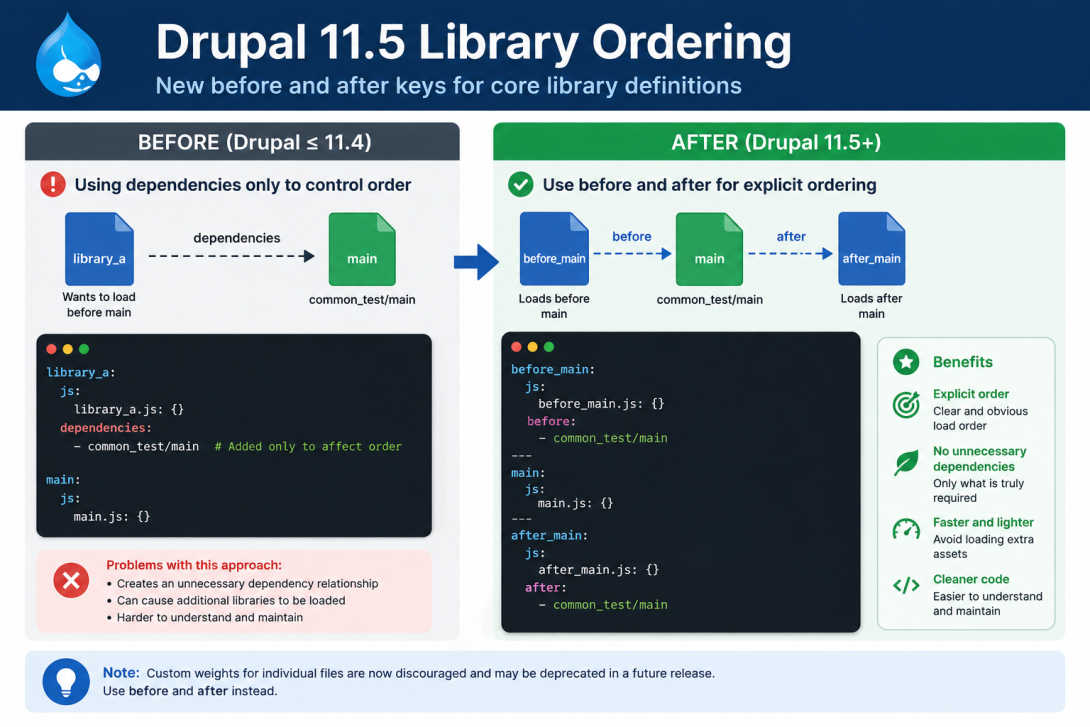
Drupal 11.5 introduces Drupal 11.5 library ordering, a new feature that allows libraries to be loaded before or after another library without declaring a dependency. The new before and after keys make asset ordering cleaner, reduce unnecessary dependencies, and provide a more maintainable way to control JavaScript and CSS loading.
Previously, developers often added dependencies solely to influence load order, even when the libraries were otherwise unrelated. This could result in additional assets being loaded unnecessarily.
Drupal 11.5 Library Ordering
The new before and after properties can be added directly to a library definition.
Example
before_main:
  js:
    before_main.js: {}
  before:
    - common_test/main

main:
  js:
    main.js: {}

after_main:
  js:
    after_main.js: {}
  after:
    - common_test/main
In this example:
before_mainalways loads beforecommon_test/mainafter_mainalways loads aftercommon_test/main- no dependency relationship is created
Why This Matters
Previously, controlling library order often meant adding something like:
dependencies:
  - common_test/main
even when the library didn't actually require it.
This caused Drupal to load additional libraries simply to satisfy dependency resolution.
With the new ordering API:
- asset order is explicit
- unrelated dependencies are avoided
- fewer unnecessary assets are loaded
- library definitions are easier to understand
Replacing File Weights
Many themes and modules have historically relied on file weights.
Example:
js:
  js/custom.js:
    weight: 100
Drupal now recommends using before and after instead.
Custom file weights are discouraged and may be deprecated in a future Drupal release.
When to Use before and after
Use these keys when:
- extending a contributed library
- overriding JavaScript behavior
- ensuring initialization scripts run in the correct order
- integrating third-party JavaScript
- organizing frontend assets in themes
Do not use them when one library genuinely depends on another. In those cases, continue using dependencies.
Benefits
The new feature provides several advantages:
- cleaner library definitions
- fewer artificial dependencies
- improved maintainability
- more predictable asset loading
- better frontend architecture
Migration Tips
When upgrading to Drupal 11.5:
- Review library definitions that use dependencies only for ordering.
- Replace those dependency declarations with
beforeorafterwhere appropriate. - Audit custom file weights and migrate to the new ordering mechanism when possible.
- Keep true dependencies unchanged.
Final Thoughts
The introduction of before and after in Drupal 11.5 is a welcome improvement to the Libraries API. It separates asset ordering from dependency management, resulting in cleaner code and more efficient library loading. As Drupal continues to modernize its frontend architecture, adopting this feature will help keep modules and themes easier to maintain.
Official Change Record:
Core library definitions support before/after ordering
Comments