
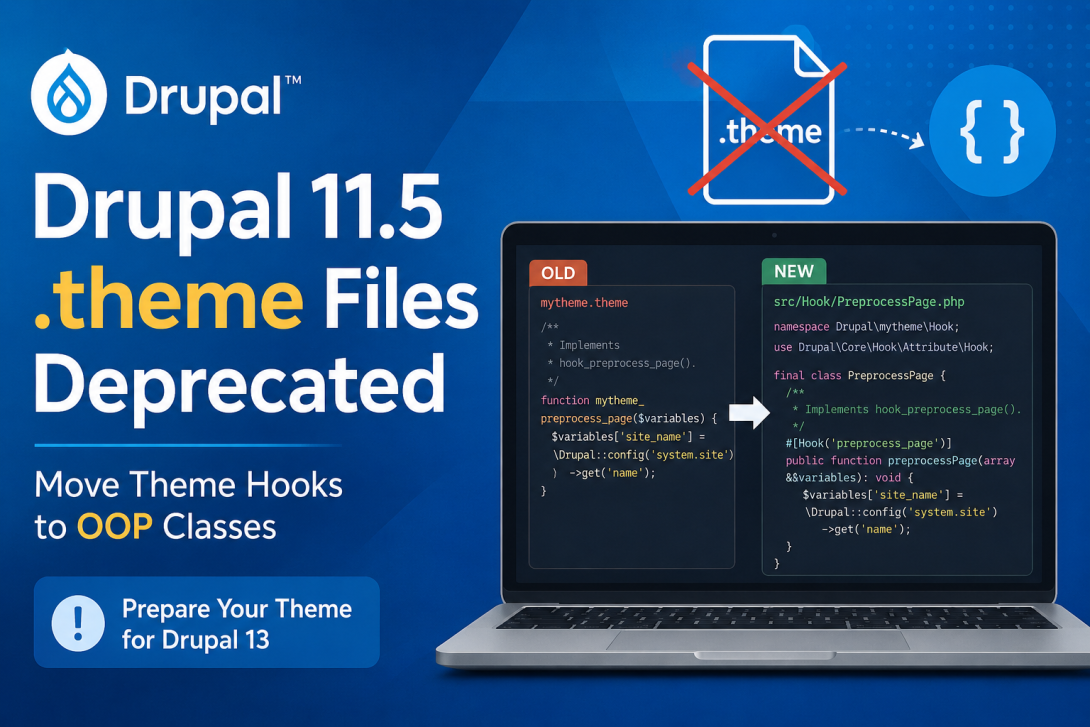
Drupal 11.5 introduces an important change for theme developers: the .theme file extension has been deprecated.
Themes have traditionally placed procedural hooks and helper functions in a file such as:
mytheme.theme
Starting with Drupal 11.5, theme hooks are expected to move to object-oriented hook classes. This change continues Drupal's broader transition toward an object-oriented architecture and follows the introduction of OOP hooks for themes.
If you maintain a custom Drupal theme, this is a change you should start addressing now—particularly if you are preparing for Drupal 13.
What Is Changing?
The .theme extension itself is deprecated in Drupal 11.5.
A typical theme may currently contain:
mytheme/
├── mytheme.info.yml
├── mytheme.libraries.yml
├── mytheme.theme
├── templates/
└── css/
The .theme file commonly contains implementations such as:
/*
 * Implements hook_preprocess_page().
 */
function mytheme_preprocess_page(array &$variables): void {
  // ...
}
It may also contain helper functions:
function mytheme_get_something(): string {
  // ...
}
Drupal 11.5 introduces a new approach: hooks should be implemented using classes rather than procedural functions in .theme files.
Why Is Drupal Moving Theme Hooks to Classes?
This change is part of Drupal's continuing modernization of its API.
Object-oriented hook implementations provide several advantages:
- Better encapsulation
- Explicit method visibility
- Improved IDE support
- Easier static analysis
- Better organization of related functionality
- Less reliance on global procedural functions
- A clearer path toward dependency-aware architecture
Instead of having dozens of unrelated functions in one .theme file, functionality can be grouped into appropriate hook classes.
Before: Procedural Theme Hooks
Consider a common hook_preprocess_page() implementation.
mytheme.theme
<?php

/**
 * Implements hook_preprocess_page().
 */
 function mytheme_preprocess_page(array &$variables): void {
   $variables['site_name'] = \Drupal::config('system.site')
    ->get('name');
}
This is the traditional Drupal approach.
The function is automatically discovered because Drupal knows how to load .theme files and recognize theme hook implementations.
After: Object-Oriented Hook Implementation
The hook should instead be moved into a hook class.
For example:
mytheme/
├── mytheme.info.yml
├── mytheme.libraries.yml
├── src/
│   └── Hook/
│       └── PreprocessPage.php
└── templates/
The implementation can then be written as:
<?php

namespace Drupal\mytheme\Hook;

use Drupal\Core\Hook\Attribute\Hook;

final class PreprocessPage {

  /
   * Implements hook_preprocess_page().
   */
  #[Hook('preprocess_page')]
  public function preprocessPage(array &$variables): void {
    $variables['site_name'] = \Drupal::config('system.site')
      ->get('name');
  }

}
The exact class organization can vary, but the important concept is that the hook implementation is now an OOP method rather than a procedural function in a .theme file.
The #[Hook] Attribute
Drupal's modern hook system allows hooks to be declared using PHP attributes.
For example:
#[Hook('preprocess_page')]
public function preprocessPage(array &$variables): void {
  // ...
}
This explicitly tells Drupal which hook the method implements.
It also replaces the implicit relationship between a function name and the hook it implements.
For example, the old:
function mytheme_preprocess_page(array &$variables): void {
}
becomes conceptually:
#[Hook('preprocess_page')]
public function preprocessPage(array &$variables): void {
}
This makes the relationship explicit.
Helper Functions Must Move Too
The change is not limited to hooks.
The change record also states that helper functions should be moved to an appropriate utility class or to a method on the hook class that uses them.
For example, a theme might currently have:
function mytheme_get_current_language(): string {
  return \Drupal::languageManager()
    ->getCurrentLanguage()
    ->getId();
}
Instead of keeping this as a global function, it should be moved into an appropriate class.
For functionality that belongs specifically to a hook, a protected method can be appropriate:
final class PreprocessPage {

  #[Hook('preprocess_page')]
  public function preprocessPage(array &$variables): void {
    $variables['language'] = $this->getCurrentLanguage();
  }

  protected function getCurrentLanguage(): string {
    return \Drupal::languageManager()
      ->getCurrentLanguage()
      ->getId();
  }

}
This keeps the helper close to the functionality that uses it.
public vs protected
When converting existing .theme functions to classes, method visibility becomes important.
Hook methods need to be accessible to Drupal's hook discovery mechanism, so they should generally be:
public function preprocessPage(...) {
}
Internal helper methods that should not be called as hooks can be:
protected function getCurrentLanguage(): string {
}
This distinction is important when converting a large .theme file.
A useful rule is:
| Method | Visibility |
|---|---|
| Hook implementation | public |
| Internal helper | protected |
| Private implementation detail | private where appropriate |
What About Services?
There is an important limitation for themes.
Themes cannot define custom services.
Consequently, utility classes used by themes cannot simply be registered as theme services in the same way that module services can.
The change record specifically notes that theme utility classes may still need to use Drupal's service locator mechanisms, such as:
\Drupal::service()
or:
\Drupal::classResolver()
For example:
$renderer = \Drupal::service('renderer');
This is not ideal from a dependency-injection perspective, but it reflects the current architecture of Drupal themes.
For complex business logic, consider whether that logic really belongs in the theme. In many cases, moving reusable functionality into a module is a better architectural solution.
Themes Without .theme Files Are Already Supported
An important detail is that Drupal supports themes without a .theme file on versions greater than Drupal 11.3.0.
That means you do not need to keep an empty .theme file simply because your theme historically had one.
For example, after conversion your theme could look like:
mytheme/
├── mytheme.info.yml
├── mytheme.libraries.yml
├── src/
│   └── Hook/
│       ├── PreprocessPage.php
│       ├── PreprocessNode.php
│       └── ThemeSuggestions.php
├── templates/
├── css/
└── js/
This is a much cleaner structure than maintaining a large procedural .theme file.
What About Existing Drupal 11 Sites?
This is where things become particularly important for theme maintainers.
The .theme extension is deprecated in Drupal 11.5, but it is not immediately removed.
You can therefore have a transition period where your existing theme continues to work while you convert its hooks.
However, the .theme files will no longer be automatically loaded in Drupal 13.
That makes migration necessary for themes that want to remain compatible with future Drupal versions.
Temporary Deprecation Suppression
Drupal provides a temporary mechanism for themes that need to support older Drupal versions.
After converting the functions to classes, you can add:
#[ExtensionFileIsConverted]
to the first function in the .theme file.
For example:
<?php

use Drupal\Core\Hook\Attribute\Hook;
use Drupal\Core\Theme\Attribute\ExtensionFileIsConverted;

#[ExtensionFileIsConverted]
function mytheme_legacy_helper(): void {
  // ...
}
However, this should not be treated as a permanent solution.
The attribute only suppresses the deprecation warning.
It does not change the fact that .theme files will no longer be automatically loaded in Drupal 13.
Therefore:
Convert first. Use the attribute only when necessary for backward compatibility.
When Should You Use ExtensionFileIsConverted?
The attribute is primarily useful when your theme needs to support Drupal versions below 11.3.0 while you are transitioning to OOP hooks.
The recommended sequence is:
1. Convert procedural hooks to OOP classes
2. Move helper functions
3. Test the theme
4. Add #[ExtensionFileIsConverted] only if legacy compatibility requires it
5. Eventually remove the .theme file entirely
Do not simply add the attribute to an unconverted .theme file and consider the migration complete.
Automating the Conversion With Rector
Drupal provides assistance for converting theme hooks.
A Rector rule and DDEV script are available to help automate the conversion.
The tool can convert hooks and add the appropriate:
#[Hook('hook_name')]
attribute together with the corresponding Implements hook_foo() documentation.
This can be particularly useful for themes containing many preprocess implementations.
For example, a theme containing:
function mytheme_preprocess_html(...) {}
function mytheme_preprocess_page(...) {}
function mytheme_preprocess_node(...) {}
function mytheme_preprocess_block(...) {}
can be migrated much faster with automated assistance.
However, not everything can be safely automated.
Helper functions and other methods should be reviewed manually and moved into appropriate classes with the correct visibility.
Example: Converting Multiple Theme Hooks
Suppose your existing theme contains:
/**
 * Implements hook_preprocess_html().
 */
function mytheme_preprocess_html(array &$variables): void {
  $variables['foo'] = 'bar';
}

/
 * Implements hook_preprocess_page().
 */
function mytheme_preprocess_page(array &$variables): void {
  $variables['site_name'] = \Drupal::config('system.site')
    ->get('name');
}
These can become separate classes:
src/
└── Hook/
    ├── PreprocessHtml.php
    └── PreprocessPage.php
PreprocessHtml.php
<?php

namespace Drupal\mytheme\Hook;

use Drupal\Core\Hook\Attribute\Hook;

final class PreprocessHtml {

  /**
   * Implements hook_preprocess_html().
   */
  #[Hook('preprocess_html')]
  public function preprocessHtml(array &$variables): void {
    $variables['foo'] = 'bar';
  }

}
PreprocessPage.php
<?php

namespace Drupal\mytheme\Hook;

use Drupal\Core\Hook\Attribute\Hook;

final class PreprocessPage {

  /**
   * Implements hook_preprocess_page().
   */
  #[Hook('preprocess_page')]
  public function preprocessPage(array &$variables): void {
    $variables['site_name'] = \Drupal::config('system.site')
      ->get('name');
  }

}
This approach makes each hook implementation small, focused, and easy to locate.
A Practical Migration Strategy
For an existing production theme, I recommend migrating incrementally.
1. Find all .theme files
Start by identifying:
*.theme
and inventory everything they contain.
Separate the contents into:
- Hooks
- Preprocess functions
- Theme suggestions
- Alter hooks
- Helper functions
- Other procedural code
2. Convert hooks first
Move hook implementations into OOP classes using the #[Hook] attribute.
3. Move helper functions
Determine whether each helper belongs:
- In the hook class
- In a dedicated utility class
- In a module instead of the theme
4. Review dependencies
Look for:
\Drupal::service()
and determine whether the functionality should instead live in a module where proper dependency injection can be used.
5. Test thoroughly
Pay particular attention to:
- Preprocess variables
- Theme suggestions
- Render arrays
- Twig templates
- Cache behavior
- Multilingual behavior
- Views and exposed forms
- Node and field rendering
6. Remove the .theme file
Once all functionality has been migrated, the ideal end state is a theme that no longer needs a .theme file.
Drupal 11.5 vs Drupal 13
The timeline is important.
| Drupal version | .theme status |
|---|---|
| Drupal 11.3+ | Themes can work without .theme files |
| Drupal 11.5 | .theme extension deprecated |
| Drupal 11.5+ | Migrate hooks to OOP classes |
| Drupal 13 | .theme files are no longer automatically loaded |
Therefore, Drupal 11.5 is the right time to perform the migration rather than waiting for Drupal 13.
What This Means for Theme Developers
This change is more than a file-extension deprecation.
It represents another step toward a more object-oriented Drupal architecture.
The recommended architecture becomes:
Theme
│
├── src/
│   └── Hook/
│       ├── PreprocessPage.php
│       ├── PreprocessNode.php
│       ├── PreprocessBlock.php
│       └── ThemeSuggestions.php
│
├── templates/
├── css/
├── js/
└── mytheme.info.yml
Instead of:
Theme
│
├── mytheme.theme
├── templates/
├── css/
├── js/
└── mytheme.info.yml
The first structure scales considerably better for large Drupal themes.
Final Thoughts
The deprecation of .theme files is an important Drupal 11.5 change that theme maintainers should not postpone.
The migration path is straightforward:
procedural hooks → OOP hook classes → utility methods/classes → no .theme file
The biggest conceptual change is moving away from Drupal's traditional THEMENAME_hook_name() functions toward explicit #[Hook()] attributes and classes.
For small themes, the migration may take only a few hours. For large themes with hundreds of lines of procedural code, automated Rector assistance can significantly reduce the initial workload—but manual review will still be necessary.
If you maintain a custom theme intended to survive into Drupal 13 and beyond, Drupal 11.5 is the time to start the conversion.
Reference
- Drupal core change record: “.theme file extensions have been deprecated”
- Issue #3581218: Deprecate
.themefile extension - Drupal core change record: Hooks in themes can now be OOP
- Rector conversion rule and DDEV assistance: available from the Drupal community tooling referenced by the change record
Comments